Registering an OAuth app
OAuth client registration is self-service. Sign in to civitai.com, open your account settings, and find the OAuth Apps card. From there you can create new apps, edit their permissions, and rotate secrets.
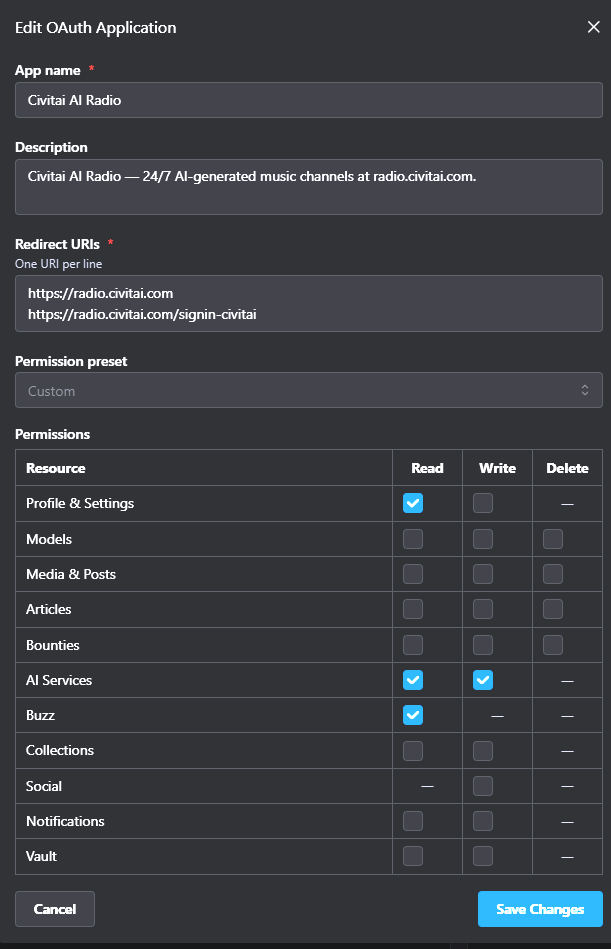
The screenshot shows a realistic baseline for any app that lets users spend their own buzz on AI generation: read their profile, read and write AI Services, and read their buzz balance.
Fields
App name
Shown to users on the consent screen ("<App name> wants to access your Civitai account"). Pick something users will recognize from your product surface.
Description
One sentence shown directly below the name on consent. Tell users what your app does and where it runs — they're about to grant it access to their account.
Redirect URIs
One URI per line. Exact match — Civitai will reject any redirect_uri parameter that isn't in this list, character for character. Common patterns:
- One entry per environment (
https://staging.example.com/oauth/callback,https://app.example.com/oauth/callback). http://localhost:3000/oauth/callbackfor local development. (HTTPS is not required forlocalhost; it is required for everything else.)- A separate callback path if you also support "Sign in with Civitai" alongside other providers (e.g.
https://app.example.complushttps://app.example.com/signin-civitai).
Changes take effect immediately — no waiting period.
Permission preset
Drop-down with four bundles for the common cases:
| Preset | Good for |
|---|---|
| Read Only | Browsers, dashboards, anything that doesn't write or spend buzz. |
| Creator | Apps that upload models / media / articles on the user's behalf. |
| AI Services | Generation-focused clients — `AIServicesRead |
| Full Access | Power-user tooling. Avoid for general distribution — users will balk. |
Pick Custom to mix and match from the permissions grid below the preset. See Scopes for the bit-by-bit breakdown.
Permissions grid
One row per resource category with Read / Write / Delete columns. Civitai honors the principle of least privilege at consent time — users see the exact set you request, so asking for less makes your app easier to approve.
WARNING
Don't pre-check Delete unless your app genuinely needs to delete on the user's behalf. Most apps that "edit" content really just need Write.
Confidential vs public client
When you create the app, you choose whether it's confidential:
- Confidential — your code runs on a server you control. Civitai issues you a
client_secretyou must keep private. Required for theclient_credentialsgrant and for calling/revoke. - Public — your code runs on a device (browser, mobile app, desktop) you can't trust to keep a secret. No
client_secretis issued. PKCE alone protects the flow.
Pick confidential by default if you have a backend; only choose public when you genuinely can't store a secret.
After you save
Civitai shows you the client_id (and client_secret, if confidential) on the success screen. The secret is shown once. Copy it into your secret store immediately — if you lose it, rotate it (see below).
You're ready to run through the quickstart.
Rotating the secret
Confidential apps have a Rotate secret action in the OAuth Apps card. Rotating invalidates the old secret immediately, so deploy the new one to your servers first, then rotate. Issued access and refresh tokens keep working — only your app's ability to mint new ones or call /revoke breaks until you update your config.
Deleting an app
Deleting an app cascades:
- All access and refresh tokens issued for the app are invalidated.
- All user consents are removed.
- All audit-log entries are retained (deletion doesn't erase history).
Users can also delete their own consent for your app from their Connected Apps card — same outcome on their tokens, no notification to you.
Verification
The isVerified flag is set by Civitai staff for trusted apps and unlocks nicer consent-screen treatment (verified badge, fewer warnings). Unverified apps still work end-to-end — verification is purely a trust-signal layer for the user.
If you ship a production OAuth integration on Civitai, reach out on the Civitai Discord to request verification once you're ready.